|
|
 |
Install BlackStormX dashboard (BSX) |
 |
Install BlackStormX dashboard (BSX)Published by  anonymous on 2004-07-16 anonymous on 2004-07-16
Category: Dashboards | Page Views: 16,297
It's sooo easy to install a hacked M$ dashboard.
It's called BlackStormX and does not need a extra tutorial, but...
BEFORE YOU START:
1. Have a client FTP and a text editor (and a hex editor if your wanna run the dash from another drive ;)... you need to know how to use them !
2. Verify that you have a FTP access to the hard drive of your Xbox (Chip or Exploit)
Please Note:
IT IS NECESSARY TO HAVE A M$ DASHBOARD 4920 ON YOUR XBOX !
STEP BY STEP:
1. Download the dashboard BlackStormX. It is actually the version 1.1. ALL sources available on the #blackstormx channel (EFnet server), by usually typing /msg bsx !list ;)
2. Launch the .exe file in a directory on your PC in order to extract the archive.
3. This directory should now contain 2 directories and 1 file:
- WIN32 [DIR]... to make your own preset
- XBOX [DIR]... what will be transfered to your Xbox
- Readme.txt ... PLEASE READ IT !
The directory XBOX contains 1 directory and 2 files:
- BlackStormX [DIR]
- BlackstormXCP.xbe
- bsXdash.xbe
4. Open the file config.xbx in the subdirectory /BlackStormX/Config with a text editor and set it up to your needs.
For that, i post and explain you mine (based on Discworld's tutorial for tHc Lite ;):
[default]
;THIS MUST BE CHANGED .:IMPORTANT:.
Xbe Name=bsXdash
Attention to change this option every time you rename your .xbe file. EG: I get my bios booting on xboxdash.xbe, so i have to rename the file BlackStormX.xbe to xboxdash.xbe and to set Xbe Name=xboxdash... BUT test the dash before making it as your default boot dashboard ;)
;Skin Related Values
Skin=Blue
Set to the skin you want to load (can be changed "on the box" through the SKINS menu of the dashboard). Blue is default.
;Music Related Values
Background Music=YES
Background Music Volume=0.7
Background music : simple YES or NO
Background Music Volume : set your default volume, between 0 and 1
;Menu Text Related Values
Menu Item 1 Text=MEMORY
Menu Item 2 Text=MUSIC
Menu Item 3 Text=WARP
Menu Item 4 Text=TUNE
Menu Item 5 Text=SKINS
Just replace TUNE etc. with what you want your orbs to be called
.
;Quick Launch L+R+Button
Quick Launch A=E:DashboardsXbox Media Centerdefault.xbe
Quick Launch B=E:DashboardsUnleashXdefault.xbe
Quick Launch X=
Quick Launch Y=
Quick launch is a command line that lets you go straight from the main menu to a game with a button combo. Simply put the location of the .xbe you want to load after each option. Maximum no. of quicklaunches is obviously 4. EG: Quick Launch A=E:DashboardsXbox Media Centerdefault.xbe by holding down L + R + A, XBMC launches on my xbox.
;Sections Related Entrys
Number of HD Menu Items=4
[section0]
Title=Games
Path=games
[section1]
Title=Applications
Path=apps
[section2]
Path=Dashboards
Title=Dashboards
[section3]
Title=Emulators
Path=emulators
First, you need to say how many option tabs you're going to have. Default is 3.
Title= what'll be displayed on the orb thing.
Path= Which folder the stuff that fits into this category is located. Don't worry about the drive name. The dash searches all drives.
Remember to use to define subfolders. EG: to let the dashboard scan E:PERSOGames, you need to set Path=DeviceHarddisk0Partition1PERSOGames
So it's done !
5. Save the file config.xbx
Note : I prefer to edit this config file by text editing. BUT once you get the dash launched, you can also press the X button on the mainmenu to get into the configuration menu and change all these settings. If you will use this "online config" don't forget to Restart and Reboot once finished ;)
Just transfer the folder BlackStormX with your modified config.xbx, and these files bsXdash.xbe and BlackstormXCP.xbe on the Xbox in the root of C:/ drive. Your C: drive should contain at least 5 directories and 4 files:
- Audio [DIR]
- BlackStormX [DIR]
- fonts [DIR]
- xboxdashdata.10027100 [DIR]
- xodash [DIR]
- BlackstormXCP.xbe
- bsXdash.xbe
- XBox Book.xtf
- Xbox.xtf
6. Start boxplorer or another file manager and launch the file bsXdash.xbe for testing ;)
Naturally it's allright and in order to boot on the dashboard BlackStormX, you have to rename the file bsXdash.xbe to xboxdash.xbe (or evoxdash.xbe), depending of your bios settings. AND set your Xbe Name=xboxdash or evoxdash in your configuration file ;)
Note : In order to run the dashboard from another drive, i.e. from E:
Edit the file bsXdash.xbe with a HEX editor, search for BlackStormX and just replace:
DeviceHarddisk0Partition2BlackStormX
with that :
DeviceHarddisk0Partition1BlackStormX
partition1 is corresponding to your E: drive and the dash will run from the root of E:/. Use partition6 to run all the shit from the root of F: or partition7 for G: ;)
7. Copy the folder BlackStormX, and these files bsXdash.xbe and BlackstormXCP.xbe to the root of E:/ drive
ATTENTION ! When you have done with your dashboard on another drive than C:, you are no more able to change a skin "on the box" (just per FTP ;): the xbe can not be patched and colors will not change. That's because the ColorPatcher BlackstormXCP.xbe ONLY RUNS ON THE ROOT OF C: !
I hope you've checked out the readme !
Anyway here are usual dashboard commands:
- X = config... don't forget to Restart and Reboot once finished
- R+L+White = Screenshot... stored on your Box in the root of E: drive in bmp format
- R+L+Right = Screensaver... to start/end animation
- R+L+Left = Harddrive INFO
- black = Memoryx... to start/end the game
- R+L+Up = Turn on Background Music (BGM) / Change ST
- R+L+Down = Turn off BGM
Note : If your screenshots seem to be cut at the bottom, please use the Screenshot Mod patch by *****db (THANKS to him !) to apply it on your .xbe file (initially called BlackStormX). Depending of your standard, download this patch for PAL or NTSC.
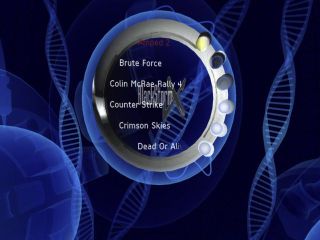
Here some screens you should see on your Xbox with the default blue skin
8. Next step is to apply a skin (other than blue or green) and customize the dashboard (i.e. texture and transparence)...
9. Your all done
ALL CREDITS AND ACKNOWLEDGMENTS GO TO
.:Team BlackStorm:.
BobMcGee - Dash Coding
acidbath - 3D Modeling/Graphics
ZogoChieftan - C++ Coding
iCeCool - Web support/MIRC support
Tayior7 - Dash Coding
Related URL: BlackStormX Homepage |
|
|
Browse Tutorials |
|
| |

 | Latest News | |
| Popular Xbox Games | |
 Advent Rising Advent Rising
 Page Views: 428,640 Page Views: 428,640
In Advent Rising, the first in a trilogy of games for the Xbox, you assume the role of Gideon Wyeth, a remnant of the last human outpost, on the brink of discovering the incredible powers that lay dor.. |  | | More Xbox Games |
| |


 HQ Network: 9,178 |
  Guests: 1183 |