|
|
 |
Adding a digital output to your Xbox (v0.1) |
 |
Adding a digital output to your Xbox (v0.1)Published by  DataBitz on 2003-10-28 DataBitz on 2003-10-28
Category: Hardware Mods/Addons | Page Views: 22,933
The following is what I have found from the forums and other do*****ents floating around the web. I do not take any credit for figuring it out, I didn't. I have tried the coax mod myself on a PAL v1.1 Xbox and it works sweet. If you try it then you will void your warranty. I take no responsibility for any damage caused by attempting this modification, hack at your own risk.
Introduction:
For reference, the pins we use are as follows:
Pin 3 = Digital SP-DIF signal
Pin 5 = Mode ground
Pin 13 = 5 volt supply (required for optical connector only)
Pin 18 = Mode 2 (when grounded tells the Xbox that an AV connector with digital output is connected, enabling the option in the menu for Dolby Digital)
Option 1. Coax (RCA):
Parts required:
- RCA socket (one that is designed to mount to a panel, not into a PCB or onto a loose wire)
- Some thin insulated wires, solder and a low wattage soldering iron with a fine tip, a torx screwdriver
Instructions:
1. Open the Xbox (voiding your warranty)
2. Remove all the drives and remove the mainboard. Flip it over and locate the AV connector (as pictured)
3. Solder a wire from Pin 5 on the AV connector to the outside (ground) leg of the RCA socket. *
4. Solder another wire from Pin 3 of the AV connector to the center (data) leg of a RCA connector. *
5. Solder another wire from Pin 18 of the AV connector to a grounded point on the board.
6. Find somewhere you would like the socket to stick out the case (make sure there's still room for it there when the case is put back together), and drill a hole and mount it there (depending on the RCA socket it could mount in one of various ways, you will need to work this out for yourself)
* There is a hole in the mainboard located next to the LAN connector, it is right next to where the '8' co-ordinate is printed. This hole is big enough to fit the 2 wires through so the RCA socket can be above the mainboard when reassembled.
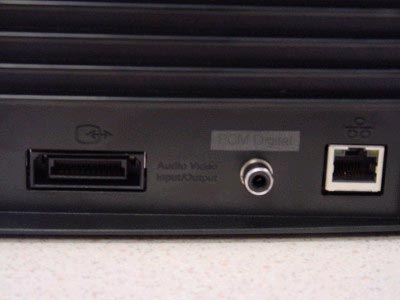
This is what it looked like when completed.
Tutorial by: DataBitz
|
|
|
Browse Tutorials |
|
| |

 | Latest News | |
| Popular Xbox Games | |
 Master Slave Master Slave
 Page Views: 273,491 Page Views: 273,491
An action RPG where you take the role of Shishiro Clandart, who has lost his memory. With the help of Iris whom you met at a forest, your objective is to recover your lost memory. The battle involves .. |  | | More Xbox Games |
| |


 HQ Network: 8,889 |
  Guests: 1469 |