HQ NETWORK:  360-Hq.Com  |  PSP-Hq.Com  |  PC-Hq.Com  |  AIDeluxe.Com  |  CXboXTool.Xbox-Hq.ComGuests: 692 | Members: 26


   Current Location: Xbox_Tutorials xecuter 3ce video   |   Don't mess with the new firefox if you run linux...   |   Need Some X3 Help   |   Auto-Installer Deluxe v4.30   |   Trouble loading games onto my Xbox   |   stupid question but   |   error 21   |   upgrade a softmodded xbox HDD WITHOUT a PC   |   Problem softmodding my crystal?????   |   HELP!!!!! cant hotswap or ftp the hard disk please HELP!!!!!   |   
  Home | Active Topics | CD/DVD Media | Downloads | Forums | Feedback | Games | HardDrives | Homebrew | My Profile | ModChips | Reviews | Search | SoftMods | Tutorials
Xbox Tutorials Database
Problems Signing up or Receiving Emails?? Please read This Topic

SmartXX v3 $55 | DuoX 2 Cromwell Edition $14.99 | DuoX 2 GS $9.90
Sign up and never pay retail again. Earn Stuff for free! Free Xbox 360, Free PS3, Free Wii
Xecuter 3 CE $51.99 | Xecuter 2.6 CE $30 | Xecuter 2.6 Programmer $15.99

 The N00b's guide to setting up Xselect v0.9
The N00b's guide to setting up Xselect v0.9
Published by pezzar on 2006-07-30
Category: Dashboards | Page Views: 1295

OK, its been a while since I had the tut bug and now its back with a vengeance.

The next target for tutting is that wonderful app called XSELECT. The issues
that were encountered were to do with the search option which to my mind
doesnt work too well. So you can set it up manually and here's how.

Do you use more than 1 dashboard, have a need to boot different options
regularly, cant fit all ur bios images onto the chip? Well your prayers are
answered. Now you only need 1 bios (and if your smart you’ll make it the
X2.5035 bios) to boot all ur different dashes/apps.

First thing you need to do is download XSelect v0.9 and
extract the file “XSELECT.XBE” then place on the root of
the Xbox C drive.

Next get ur favourite X2 bios and configure it ensuring that
the dash boot paths in the “X2CONFIG.INI” have C:XSELECT.XBE
as the first option.

Great, now reboot the xbox and you’ll see the following
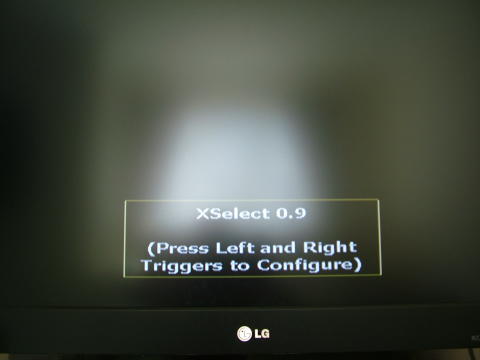

Smooth, now turn the xbox off and go to ur PC and open Notepad.
Enter a list of dashes on the Xbox that you
would like the choice to boot from. It should look like this


Now just use File then Save As and call it DASHES.TXT
Now File then New and enter a list of Apps you like the choice to
boot from.


Ok now saves it as APPS.TXT

You now need to FTP both these files to the following location
on ur Xbox

E:/UDATA/01010001/123456789ABC

Reboot the Xbox and have the Xenium set to instant boot with
the X2 bios set as default. This time when the XSELECT screen
shows use the left trigger to select apps and the right trigger to
select dashes. Your now hot to trot ;)

Spoon feed, I don’t think so it really is too easy for all that :)


Related URL: Forum thread here.
 Browse Tutorials
236 Xbox Tutorials | 1737934 page views
 
A  B  C  D  E  F  G  H  I  J  K  L  M  N  O  P  Q  R  S  T  U  V  W  X  Y  Z  
 
0  1  2  3  4  5  6  7  8  9 | Most Popular Xbox Tutorials ::.

 
 Survey
What Default Xbox Dashboard do you use?

Evox
Xbox Media Center
AvaLaunch
UnleashX
MediaXMenu
BlackStormX
NexGen
THc
M$ Retail Dashboard
Other (Not Specified)


Results
Polls

Votes: 3170
Comments: 17
 Latest News
A Look At EA's Dead Space Box Art.. ::.
Here is the new Box Art for EA's Dead Space due out on Oct 31, 2008:Set in the cold blackness of deep space, the atmosphere is soaked with a feeling of tension, dread and sheer terror. In Dead Space, players step into t.. ::.
.......................................................................
Rock Band 2 Leaks More Songs?.. ::.
Battlefield: Bad Company Primo Guide Pre.. ::.
Sony's PS3 2.40 Firmware Update Fails, F.. ::.
Infinity Ward says: No Trophies for CoD4.. ::.
More News | Submit News
 Popular Xbox Games
Rolling
   Page Views: 47806

ROLLING features the World's top inline skaters from the streets and the circuits as they battle it out to conquer the most challenging urban terrain and skate parks across the globe. Ride the ramps o..
More Xbox Games
 Most Recent Xbox Tutorials
How to Change Your DVD Drive
Repair your XBOX C drive WITHOUT eeprom
Correct way to HotSwap - for newbies!
Copy Between Two Xboxes using Xbox FTP
Updating XBMC SVN Build.
How To Put in a Bigger Hd with a chip and taking the chip out to reuse again.
Very Easy Clear Jewel Mod
Update AID using the AID ISO Updater
DVD Burner Freezing? Try these steps...
Xbox Error Using Linux Files
Submit New Xbox Tutorial
 User Info
You are NOT currently logged in..
Please log in or register for free by clicking here

Important Note:
All new users must click a activation link within 24hrs.
Register for Free! | Lost Password