Joined: Jun 27, 2007 Posts: 1135 Location: Melbourne, Australia
Posted: Fri Oct 10, 2008 3:13 pm Post subject: Connect 2 wireless NIC's to a PC
My xbox upstairs has a wireless router connected to it. The router is not connected to the internet as the router downstairs is (plus the phone socket is too far). The reason it has a router is because i disconnect my pc from the interenet router downstairs so i can connect to my xbox router upstairs to transfer files.
I have 2 wireless pci cards, my question is how do i configure the cards so that i can connect to my xbox router and to the internet router at the same time and have everything working like a charm? _________________ Opinions are like arse holes, everybody has one and your's stinks.
FinalCloud Moderator
Joined: Nov 03, 2006 Posts: 2283 Location: Plymouth, UK
Posted: Fri Oct 10, 2008 3:34 pm Post subject:
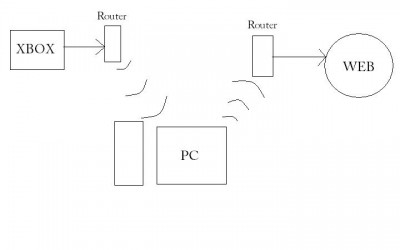
So, are you looking for this sorta setup?
(Excuse the little diagram, I knocked it up quickly in Paint)
Joined: Jun 27, 2007 Posts: 1135 Location: Melbourne, Australia
Posted: Fri Oct 10, 2008 3:40 pm Post subject:
FinalCloud, you got it. That is exactly what i'm on about.
The diagram is great, you could easily knock Rolf Harris off the top spot _________________ Opinions are like arse holes, everybody has one and your's stinks.
Div Moderator
Joined: Jun 27, 2007 Posts: 1135 Location: Melbourne, Australia
Posted: Fri Oct 10, 2008 3:42 pm Post subject:
I have connected to both at the same time already, but can only transfer stuff to the xbox, the internet freezes. Im not sure about subnet masks and ip routing stuff. _________________ Opinions are like arse holes, everybody has one and your's stinks.
FinalCloud Moderator
Joined: Nov 03, 2006 Posts: 2283 Location: Plymouth, UK
Posted: Fri Oct 10, 2008 4:04 pm Post subject:
Ok, is your PC set to recieve it's IP address dynamically, or do you have a set, static IP?
P.S. No-one can knock old Rolfy off the top spot, he's a master! lol
Tricky setup :p. Cannot follow your thoughts to connect the upstairs router directly to the PC, and use that for internet sharing. All overhead and you need to bridge your networks. Better is to connect the router upstairs as AP (WDS mode) or Repeater for the one connecting to the internet. If you give me your brand/type of routers I can help you with that. I also used to have a wireless gaming adapter (Sitecom WL-130) connected to my XBOX in the bedroom. Works fine, but I got very annoyed about performance. Now I invested in a powerlan (like devolo). Just connect the XBOX and your internetrouter with one adapter and you'll be amazed about the performance. 187Mbps (20MB/s) is a relieve when streaming... or Qwixing.
FinalCloud Moderator
Joined: Nov 03, 2006 Posts: 2283 Location: Plymouth, UK
Posted: Sun Oct 12, 2008 4:52 pm Post subject:
You could assign a different pci card to a different router. In theory, if your PC can get Internet activity, then you should be able to connect the Xbox to the net, using the PC as like a pass-through.
For example, if you select PCI card one to connect to your Internt router, get that set up and get Internet on your PC.
Then assign PCI card two to connect to the other router and get connectivity there. Now, whether or not you'll need to bridge those connections in like an internet sharing kinda way, I don't know.
My Xbox connects to my pc and my PC to an Internet router. If you're using programs like Xlink Kai, you don't need to manually bridge connections in Windows, cos Kai does it for you.
Might be worth giving those things a go and seeing how you get on.
Joined: Jun 27, 2007 Posts: 1135 Location: Melbourne, Australia
Posted: Wed Oct 15, 2008 10:20 am Post subject:
I have connected the 2 cards to the 2 seperte routers simultaneously. While connected, i can only access the xbox router and cannot get on the net until i disconnect the card connecting to the xbox.
I think it must be a problem with the IP addreses, of which i am no good with. I'll have to read up on it.
As for bridging the 2 wireless connections, it won't allow that, you can only seem to bridge a wireless network with a wired network. _________________ Opinions are like arse holes, everybody has one and your's stinks.
crackface47 Xbox-HQ Elite Member
Joined: Jan 30, 2007 Posts: 344 Location: GA, United States
Posted: Thu Oct 16, 2008 9:24 pm Post subject:
do what i did, i have my dsl modem with a cable running to my 8-port gig dlink router, then one form there to my 100$, HD streaming xtreme-n gig wireless router, then one from there to my linksys wireless router upstairs, so i have my 360 hooked up to my d-link router, so i have wireless inernet and wired inernet in my basement, and wireless upstairs, i can surf the web, play xbox live, and tansfer files perfectly, only problem is if i'm on one wireless router, i can't acess a computer from a different one, still working on it, just run a lan cable to ur routers, a 50 foot cable cost like under 30$ at bestbuy
|
All times are GMT |Page 1 of 1
You cannot post new topics in this forum You cannot reply to topics in this forum You cannot edit your posts in this forum You cannot delete your posts in this forum You cannot vote in polls in this forum You cannot attach files in this forum You can download files in this forum


 HQ Network: 10,137 |
  Guests: 1724 |
  Members: 0
  Forums